Get an access token
The Workforce Authority APIs authenticate the same way, apart from Get a WebAuthn challenge, which takes no token, and the Core API v11 agent endpoints for certificate renewal and event upload. Your client sends a bearer access token, issued by your tenant's OIDC server for an application you create in Workforce Authority. This page covers the User Authentication API, the Object Management API and the Core API v11.
Request tokens from your tenant's own token endpoint, which the steps below show you how to find. Do not use the built-in /oauth/token endpoint. It is the legacy issuer, and it may be disabled for your tenant.
If your organization already runs an OAuth server, you can use its tokens instead. See Use your own OAuth server.
Create an application for your client
-
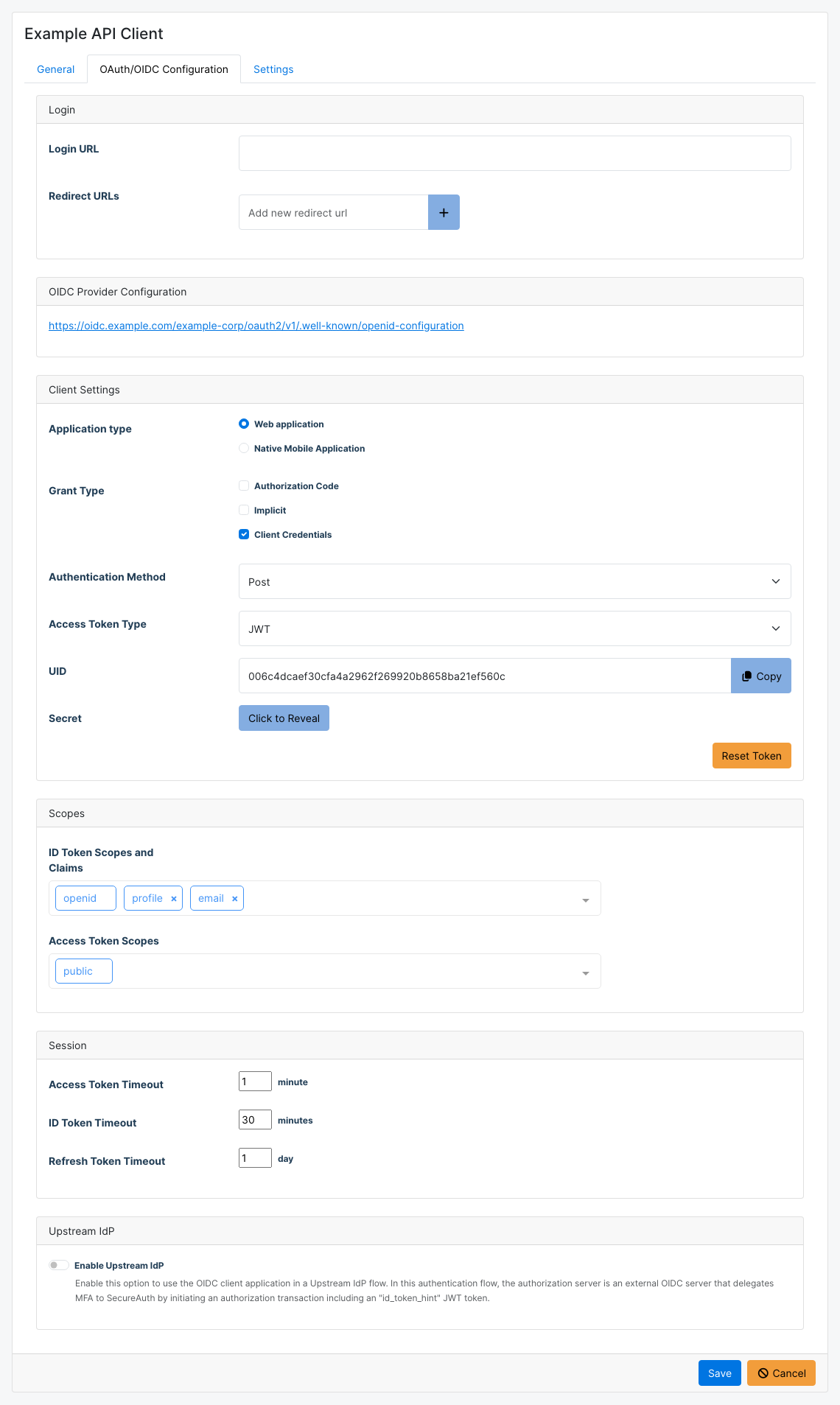
In the Workforce Authority admin console, go to Applications and click Create New Application. Set Type to OAuth/OIDC Application and Template to OpenID Connect Relying Party Application [oidc_client].
-
Open its OAuth/OIDC Configuration tab.
-
Under Grant Type, select Client Credentials. An application that only uses client credentials needs no redirect URL.
-
Leave Access Token Type set to JWT. The APIs read the token's claims, so they cannot accept an opaque token.
-
Under Access Token Scopes, add every scope your client will request. Each API page lists the scopes its endpoints need.
-
Save, then copy the UID and reveal the Secret. These are your
client_idandclient_secret.
Find your token endpoint
The OIDC Provider Configuration section of the same tab links your tenant's discovery document. It has this form:
https://OIDC_SERVER_URL/TENANT/oauth2/v1/.well-known/openid-configuration
TENANT is your tenant's slug, the same value throughout this page.
Open it and read two values:
token_endpointis where you request access tokens.jwks_uripublishes the keys that sign them, if your own service needs to verify a token.
Request a token
Send a client_credentials request to the token_endpoint. With the Authentication Method set to Post, the credentials travel in the form body:
curl -X POST "https://OIDC_SERVER_URL/TENANT/oauth2/v1/token" \
  -H "Content-Type: application/x-www-form-urlencoded" \
  -d "grant_type=client_credentials" \
  -d "client_id=YOUR_APPLICATION_UID" \
  -d "client_secret=YOUR_APPLICATION_SECRET" \
  -d "scope=public"
| Parameter | Description |
|---|---|
| grant_type | client_credentials |
| client_id | The application's UID |
| client_secret | The application's Secret |
| scope | A space-delimited list of the scopes to issue. Each must be listed under the application's Access Token Scopes. |
With Basic selected instead, send the UID and secret in an HTTP Basic Authorization header and leave them out of the body.
The response carries the token and its lifetime, which the application's Access Token Timeout sets:
{
   "access_token": "YOUR_ACCESS_TOKEN",
   "token_type": "Bearer",
   "expires_in": 60,
   "scope": "public"
}
Access tokens are JWTs of about 1 KB, and they grow with their scopes. Store them without a length limit, or in at least 2048 bytes.
Call the API
Send the token in the Authorization header of every request:
Authorization: Bearer YOUR_ACCESS_TOKEN
Request a new token when the current one expires.
Use your own OAuth server
A tenant can register its own OAuth server as a provider. The APIs then accept access tokens that server issues, alongside tokens from the tenant's OIDC server.
-
In the admin console, go to External IdPs > Providers and create an OAuth provider.
-
Enter your server's discovery URL and click Fetch configuration. It fills in the JWKS URL from the discovery document, and the issuer if that is empty. Your browser makes the request, so if your server blocks cross-origin requests, enter the issuer and JWKS URL yourself, or paste the key set.
-
Map your token's claims to the attributes Workforce Authority reads. A token has to name the Workforce Authority application it acts for as
client_id, and carry the scopes the endpoint requires.The token acts as the application when its user identifier is absent or equals
client_id. The user identifier issub, or the claim chosen under User Identifier Correlation. Any other value is read as a user, and that setting must match it to an existing user.Some rules apply to the raw token and cannot be mapped:
- It must carry the
aud,exp,iatandissclaims. - Its
audmust behttps://YOUR_HOST/api/v11/TENANT, whereYOUR_HOSTis the platform host rather than a custom domain. The Core API v11 also acceptshttps://YOUR_HOST/api/v11; the User Authentication and Object Management APIs do not. - Its header must carry a
kidthat names a key in the provider's JWKS. - It must be signed with an asymmetric key: RS, PS, ES or EdDSA. Tokens signed with a shared secret, such as HS256, are rejected.
- It must carry the
-
Save the provider.
Workforce Authority matches each token to a provider by its iss claim. A token whose issuer matches no provider is rejected.