ApacheDS integration with the LDAP Agent
The Workforce Authority LDAP Agent provides a means of integrating an enterprise's directory service with Workforce Authority and other services that require authentication or user details, such as single sign-on (SSO). As long as it can communicate with the enterprise's directory server, the Workforce Authority LDAP Agent can deploy to a customer's on-premises server or preferred cloud environment.
Besides Active Directory, the Workforce Authority LDAP Agent is compatible with other LDAP directories , such as ApacheDS™. ApacheDS is an extensible and embeddable directory server entirely written in Java, which has been certified LDAPv3 compatible by the Open Group.
This document has been successfully tested against ApacheDS™ 2.0.0.AM26.
Prerequisites
-
Configured Workforce Authority instance and user account with administrative privileges for Workforce Authority.
-
Configured Workforce Authority LDAP Agent.
For more information, see the Workforce Authority LDAP Agent deployment guide.
-
Have ApacheDS installed.
ApacheDS configuration
-
Make the following attributes available in ApacheDS to communicate with the Workforce Authority LDAP Agent:
-
CN
-
SN
-
UID
-
userPassword
-
sAMAccountName
NotesAMAccountName is not a default attribute in ApacheDS and should be added through an Object Class that contains sAMAccountName.
-
mail
-
Object Class - inetOrgPerson (structural)
-
Object Class - person (structural)
-
Object Class - top (abstract)
-
Object Class - extensibleObject (auxiliary)
-
organizationalPerson (structural)
-
-
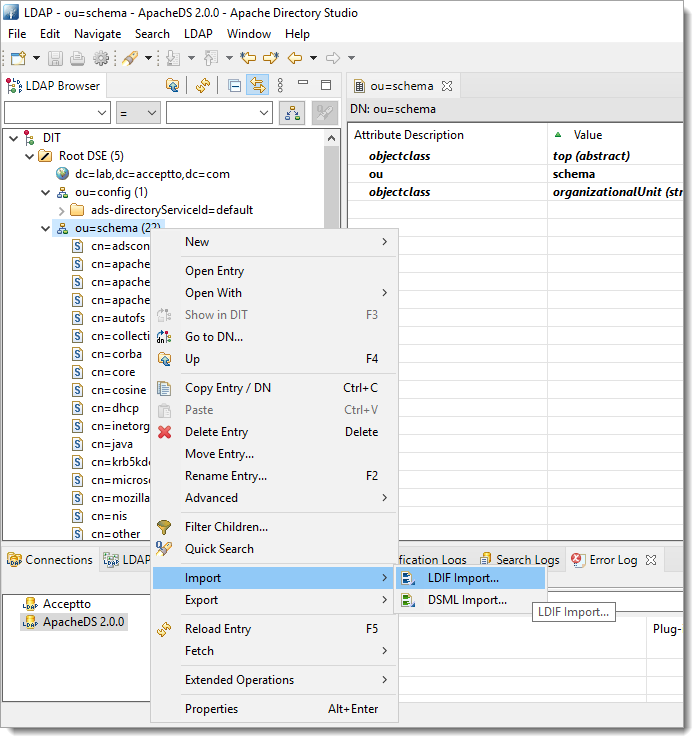
See the GitHub active-directory-to-openldap/schema/ repository for Schema and Attribute codes. Then, create an LDIF file and import it to your ApacheDS.
Workforce Authority LDAP Agent configuration
-
Configure the communication between the Workforce Authority LDAP Agent and ApacheDS using the following information:
URL Enter the LDAP URL to use when performing LDAP queries. The URL must begin with ldap://orldaps://and may include an optional port number to override the defaults of port 10389 for ldap and port 10636 for ldaps. For example,ldap://ldap.company.com:10389/orldaps://ad1.example.org:10636/.User Name Enter the name of the user used to bind to the LDAP server. This may be a DN or CN, such as uid=admin,ou=system or cn=John,ou=users,ou=system. A new account with read-only access to the directory should be provisioned for the agent and used for binding. Password Enter the password of the user used to bind to the LDAP server. Base DN Enter the Base DN to use when performing LDAP queries. All relevant users and groups must be descendants of this DN. For example, DC=company,DC=com. TLS Trusted CAs Optional. Enter a list of certificates in PEM format representing trusted certificate authorities (CAs) to be used when verifying the LDAP server's certificate. These could include an enterprise CA used to issue certificates to LDAP servers or the certificate of the LDAP server itself. 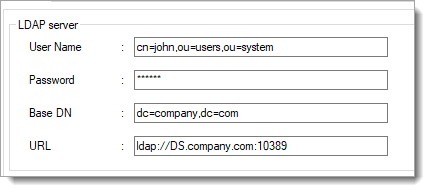
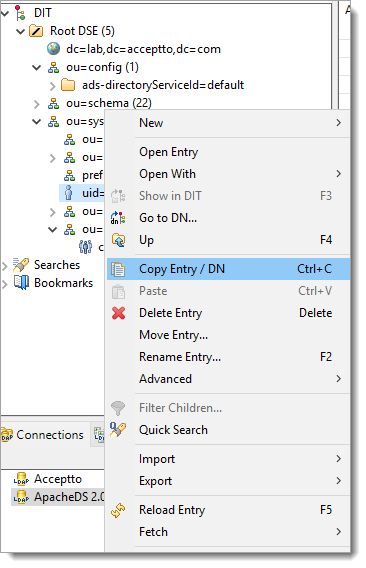
To find User DN or CN, right-click on the user in the ApacheDS browser and select Copy Entry / DN.